
Branding
Branding Project
Project: Logo Branding & Brand Identity
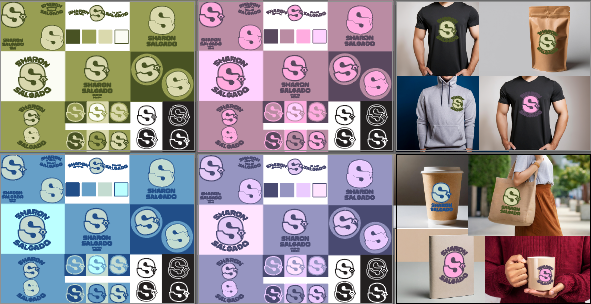
Step 1: Establish the brand foundation by designing the primary logo, secondary logo, and alternative marks. Begin by sketching and digitizing your core concept in Illustrator using the pen tool and basic geometric shapes.
Once the primary logo is finalized, create a secondary (stacked or horizontal) version for different layout constraints, and a simplified alternative logo (like a submark or monogram). During this step, also design a custom set of brand emoticons or icons that match the visual style of your primary logo to ensure a cohesive brand voice across digital platforms.
Step 2: Define the visual guidelines by establishing your color swatches, typography, and supporting imagery. Create a dedicated global color palette in the Swatches panel, ensuring you include primary, secondary, and neutral tones.
Next, typeset the brand's slogan using the Type tool, experimenting with tracking and kerning to complement the primary logo's typography. Finally, curate or design a library of supporting imagery—such as custom vector patterns, textures, or graphic elements—that reinforce the brand’s overall aesthetic.
Step 3: Bring the brand identity to life by creating professional mockups. Place your completed logos, color swatches, and supporting imagery onto various real-world applications within Illustrator, such as business cards, stationery, packaging, clothing or other objects related to the company.
Use Clipping Masks, blending modes, and opacity settings to seamlessly integrate your vectors onto the mockup surfaces, ensuring the final presentation looks realistic and cohesive.
Related Weekly Assignments
Power in Numbers
Project Gallery


